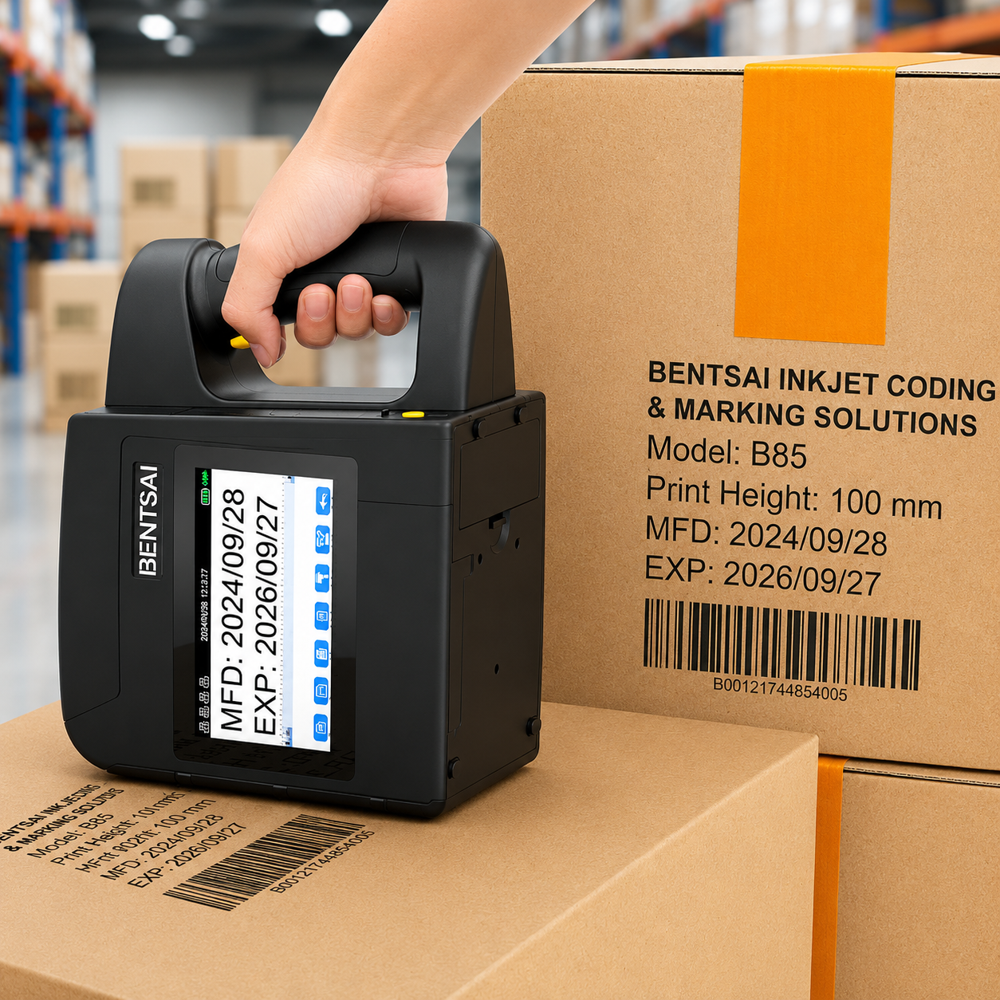
| Display | 5 HD Touch Screen |
| Operation System | Linux based |
| System Languages | English / German / French / Italian / Spanish / Portuguese / Slovenian / Serbo-Croatian / Czech / Bulgarian / Romanian / Polish / Greek / Hungarian / Russian / Ukrainian / Slovak / Arabic / Persian / Turkish / Chinese / Traditional-Chinese / Japanese / Korean / Hindi / Thai / Vietnamese / Indonesian / Burmese/ Hebrew (Available languages vary for different regions) |
| Embedded Memory | 4G |
| Status Alarm | Green: Ready | Blue: Printing | Red: Alarm |
| Battery | 6000mAh 18650 lithium ion batteries x 2 | Operating time up to 8 hours |
| Working Environment | Storage: -2-55 | Working: 5-35 | Humidity: 10%-80% |
| Application Mode | Handheld/Inline |
| Power Ports | USB-C 9V/5A Battery Charging |
| I/O Ports | USB-A, USB-C, Power port, Sensor port, Beacon port, Encoder port |
| Accessories | Ink Cartridge *4, U-Disk *1, Positioning Plate *1, AC/DC Power Adaptor *1, Photocell Sensor *1 |
| Technology | Thermal Inkjet Printing Technology |
| Coding & Marking Type | Text, Numbers, Images, Logo, 2D codes, Barcodes, Dates, Counter, Database and etc. |
| Image Formats | JPG, JPEG, PNG, BMP |
| Barcode Formats | Code128, Code39, EAN8/13, UPCA, ITF ( 2of5 ), ITF14 |
| 2D Code Formats | QR, DM, GS1DM |
| Fonts | True type fonts, Dot-matrix fonts |
| Printable Materials | Water-based ink for porous and semi-porous substrates: Paper / Corrugated box / Wood / Fiberboard / Textile and etc. Solvent-based ink for semi-porous and non-porous substrates: Plastic / Glass / Metal plate / Alu-foil / Cable and etc. |
| Ink Throw Distance | 2mm-5mm (Distance between nozzle plate and print object) |
| Gray Level Options | 1-10 |
| Ink Cartridges Colors | Water-based Color options: Black, Cyan, Magenta, Yellow,Green Solvent-based Color options: Black, Cyan, Magenta, Yellow, White, Green |
| Print Height | 2.5mm-92 mm (1-40 Lines) |
| Resolution | 300 dpi |
| Max. Print Size | 92 mm * 2100 mm |
| Max Pixel Size | 566px*12800px |
| Max. Print Speed | 60 m / min |
| Model Name | B85 |
| Printheld | 100mm /425.4mm*4 |
| Operating Mode | Handheld/Inline |
| Dimension | 232mm*110mm*180mm |
| Weight | 1240g |
| Packaging | 705mm*215mm*265mm 5168g |
Versatile Inline CodingThe Bentsai B85 Handheld Inkjet Printer is engineered for seamless inline coding, making it ideal for marking packages, products, and labels in fast-paced production environments. Its semi-automatic operation allows users to print continuously without unnecessary interruptions, boosting efficiency for businesses handling large volumes.
Cutting-Edge ConnectivityEquipped with both USB and Ethernet interfaces, the B85 offers flexible and reliable connectivity options. This ensures easy integration into existing systems across manufacturing or packaging lines, whether you need a dedicated workstation setup or a networked environment.
FAQ's of Bentsai B85 Handheld Inkjet Printer (4-Inch, 100mm):
Q: How do I operate the Bentsai B85 Handheld Inkjet Printer for best results?
A: To achieve optimal printing quality, ensure the printer is charged and loaded with the appropriate ink. Connect via USB or Ethernet as needed, hold the unit steadily over the target surface, and glide smoothly to apply the print. Refer to the user manual for additional tips and maintenance procedures.
Q: What materials and surfaces can the Bentsai B85 print on?
A: The B85 is designed to print on a wide variety of surfaces, including paper, cardboard, wood, metal, and certain plastics, making it suitable for coding on packaging and products in diverse industries.
Q: When should I choose the B85 for my business operations?
A: The Bentsai B85 is ideal for businesses needing efficient inline coding and database printing, especially in industries handling significant product volumes, such as export, import, manufacturing, and supply.
Q: Where can the Bentsai B85 be implemented in a production line?
A: This printer can be used at various stages of your workflow, such as at packaging lines for real-time marking, or at dispatch areas for labeling and coding outgoing goods. Its portability allows for flexible integration wherever it's needed.
Q: What is the process for connecting the B85 printer to a database?
A: To connect to a database, use the USB or Ethernet interface to link the printer with your workstation. The device supports database-driven printing, allowing you to upload variable data such as codes, dates, or batch numbers directly from your system.
Q: How is the Bentsai B85 beneficial for exporters and manufacturers in India?
A: The B85 streamlines product identification, ensures regulatory compliance, and accelerates the labeling process, saving time and reducing errors-key benefits for exporters and manufacturers needing reliable and efficient marking fields.